PyHermes in Jupyter Notebook
README:
Choosing to use Jupyter Notebook, as you probably know, has its advantages:
Intuitive and Convenient.
However, the downside is that it doesn’t support parallel computing, which means you can’t fully leverage the power of pyhermes.
Therefore, Jupyter Notebook is better suited for small-scale data testing, debugging, and similar purposes.
Calculate convols
calculate the
DeltaCwith parameters in fileparams_convols.json
NOTICE:
Calculating
DeltaCis the initial step for computing subsequent quantities, such as counting, 2PCF, and 3PCF.
The file of param_convols.json looks like:
{
  "Convols": {
    "J": 9,
    "fin": {
      "path": "https://pyhermes.astroslacker.com/_downloads/906e0695649e3634a5fe8081b9ab2086/quijote10000.bin",
      "format": "generic"
    },
    "fout_path": "./Output_ConvolsData_example.npy",
    "SampRate": 1024,
    "SimBoxL": 1000,
    "window": {
      "type": "shell",
      "R": 5
    },
    "wavelet_mode": "db2",
    "wavelet_level": 10,
    "bandwidth": 1,
    "threads": 2
  }
}
[2]:
from pyhermes.base.convols import Convols
from pyhermes.param.parambase import read_param
[3]:
param_input = read_param(config_path='param_convols.json')

deltac, pm = Convols(param_task=param_input).run(return_pData=True)
09:01:52 - INFO - pyhermes.param.parambase:JsonBase - Reading configure file: '/data/luantch/ding_workspace/Hermes/github_zone/PyHermes/tests/param_convols.json'
09:01:52 - INFO - pyhermes.param.parambase:JsonBase - Set default parameters of module <base> ...
09:01:52 - INFO - pyhermes.param.parambase:JsonBase - Set default parameters of module <base> ...
09:01:52 - INFO - pyhermes.param.parambase:JsonBase - Default 'Convols.fin.path' from './data.bin' to 'https://pyhermes.astroslacker.com/_downloads/906e0695649e3634a5fe8081b9ab2086/quijote10000.bin'
09:01:52 - INFO - pyhermes.param.parambase:JsonBase - Default 'Convols.fout_path' from 'empty' to './Output_ConvolsData_example.npy'
09:01:52 - WARNING - pyhermes.param.parambase:JsonBase - Adding non-default key: 'Convols.window.R'
09:01:52 - INFO - pyhermes.param.parambase:JsonBase - Default 'Convols.threads' from '1' to '2'

09:01:52 - INFO - pyhermes.pipeline.pipeline:Convols - The task will run on 1 MPI ranks
09:01:52 - INFO - pyhermes.io.funcs:read_particle_data - Selected input particle format: generic
09:01:52 - INFO - pyhermes.io.funcs:dl_rich_pbar - File 'quijote10000.bin' already exists. Skipping download.
09:01:52 - INFO - pyhermes.io.funcs:read_generic - Reading paricle data from ---> quijote10000.bin <---
09:01:54 - INFO - pyhermes.pipeline.pipeline:Convols - Start partition ...
09:01:54 - INFO - pyhermes.pipeline.pipeline:Convols - The time for partition data: 0.0161 sec
09:01:54 - INFO - pyhermes.pipeline.pipeline:Convols - Start to calculate scaling coefficient...
09:01:57 - INFO - pyhermes.pipeline.pipeline:Convols - The time for scaling function: 2.7760 sec
09:01:57 - INFO - pyhermes.utils.math_util:set_window_function - Using window function: shell
09:01:59 - INFO - pyhermes.pipeline.pipeline:Convols - Start to calculte FFT
09:02:02 - INFO - pyhermes.pipeline.pipeline:Convols - The time for FFT: 2.9848 sec
09:02:02 - INFO - pyhermes.io.base:ConvolsData - Writing data to ---> ./Output_ConvolsData_example.npy <---

09:02:04 - INFO - pyhermes.pipeline.pipeline:Convols - The time for task: 12.4039 sec
09:02:04 - INFO - pyhermes.pipeline.pipeline:Convols - Bye.
[4]:
deltac.data.sum()
[4]:
406702.9084193025
Here, deltac contains all the information from the Convols results, which belong to an instance of ConvolsData.
[8]:
print(deltac.dict_inht_vonDeltac)
{'fin_path': 'https://pyhermes.astroslacker.com/_downloads/906e0695649e3634a5fe8081b9ab2086/quijote10000.bin', 'fin_format': 'generic', 'orgDsize': 406793, 'J': 9, 'SampRate': 1024, 'window': {'type': 'shell', 'R': 5}, 'SimBoxL': 1000, 'bandwidth': 1, 'wavelet_mode': 'db2', 'wavelet_level': 10}
[5]:
print(deltac.data.shape)
print(type(deltac))
(512, 512, 512)
<class 'pyhermes.io.convols.ConvolsData'>
The pm variable holds the particle data, which can be directly used for further calculations, such as computing the 3PCF. This eliminates the need to reload the particle data from disk. You can enable this by setting the return_pData argument to True; otherwise, only deltac will be returned without pm.
[6]:
print(pm.shape)
print(type(pm))
(406793, 3)
<class 'numpy.ndarray'>
Counting
Method1: Read DeltaC from path in
param_counting.json
The file of param_counting.json looks like:
{
  "Counting": {
    "n_tasks": 100,
    "deltac_in_path": "./Output_ConvolsData_example.npy",
    "fout_path": "./Output_CountingData_example.npy"
  }
}
[9]:
from pyhermes.theory.counting import Counting

param_input = read_param(config_path='param_counting.json')

counting = Counting(param_task=param_input).run()
09:12:09 - INFO - pyhermes.param.parambase:JsonBase - Reading configure file: '/data/luantch/ding_workspace/Hermes/github_zone/PyHermes/tests/param_counting.json'
09:12:09 - INFO - pyhermes.param.parambase:JsonBase - Set default parameters of module <theory> ...
09:12:09 - INFO - pyhermes.param.parambase:JsonBase - Set default parameters of module <theory> ...
09:12:09 - INFO - pyhermes.param.parambase:JsonBase - Default 'Counting.n_tasks' from '1000000' to '100'
09:12:09 - INFO - pyhermes.param.parambase:JsonBase - Default 'Counting.deltac_in_path' from 'empty' to './Output_ConvolsData_example.npy'
09:12:09 - INFO - pyhermes.param.parambase:JsonBase - Default 'Counting.fout_path' from 'empty' to './Output_CountingData_example.npy'

09:12:09 - INFO - pyhermes.pipeline.pipeline:Counting - The task will run on 1 MPI ranks
09:12:09 - INFO - pyhermes.io.base:CountingData - Reading DeltaC data from ---> ./Output_ConvolsData_example.npy <---
09:12:10 - INFO - pyhermes.io.base:CountingData - DeltaC: Shape(512, 512, 512), Min = -0.0303, Max = 0.1416, Mean = 0.0030
09:12:10 - INFO - pyhermes.pipeline.pipeline:Counting - Start Counting ...
09:12:11 - INFO - pyhermes.pipeline.pipeline:Counting - Gathering data from all ranks ...
09:12:11 - INFO - pyhermes.pipeline.pipeline:Counting - The time for counting is: 0.7274 sec
09:12:11 - INFO - pyhermes.io.base:CountingData - Writing data to ---> ./Output_CountingData_example.npy <---

09:12:11 - INFO - pyhermes.pipeline.pipeline:Counting - The time for task: 1.8091 sec
Counting
Method2: Load DeltaC directly from the result of previous step, i.e.,
deltac
NOTICE:
Using the
deltac=argument in argv will override thedeltac_in_pathsetting inparam_couting.json.
[10]:
from pyhermes.theory.counting import Counting

param_input = read_param(config_path='param_counting.json')

counting = Counting(param_task=param_input).run(deltac=deltac)
09:12:33 - INFO - pyhermes.param.parambase:JsonBase - Reading configure file: '/data/luantch/ding_workspace/Hermes/github_zone/PyHermes/tests/param_counting.json'
09:12:33 - INFO - pyhermes.param.parambase:JsonBase - Set default parameters of module <theory> ...
09:12:33 - INFO - pyhermes.param.parambase:JsonBase - Set default parameters of module <theory> ...
09:12:33 - INFO - pyhermes.param.parambase:JsonBase - Default 'Counting.n_tasks' from '1000000' to '100'
09:12:33 - INFO - pyhermes.param.parambase:JsonBase - Default 'Counting.deltac_in_path' from 'empty' to './Output_ConvolsData_example.npy'
09:12:33 - INFO - pyhermes.param.parambase:JsonBase - Default 'Counting.fout_path' from 'empty' to './Output_CountingData_example.npy'

09:12:33 - INFO - pyhermes.pipeline.pipeline:Counting - The task will run on 1 MPI ranks
09:12:33 - INFO - pyhermes.pipeline.pipeline:Counting - Loading DeltaC from argument 'deltac'
09:12:33 - INFO - pyhermes.pipeline.pipeline:Counting - Start Counting ...
09:12:33 - INFO - pyhermes.pipeline.pipeline:Counting - Gathering data from all ranks ...
09:12:33 - INFO - pyhermes.pipeline.pipeline:Counting - The time for counting is: 0.0014 sec
09:12:33 - WARNING - pyhermes.io.funcs:check_fout - Output file './Output_CountingData_example.npy' already exists! Generating a new file name.
09:12:33 - INFO - pyhermes.io.base:CountingData - Writing data to ---> ./Output_CountingData_example_1.npy <---

09:12:33 - INFO - pyhermes.pipeline.pipeline:Counting - The time for task: 0.0081 sec
09:12:33 - INFO - pyhermes.pipeline.pipeline:Counting - Bye.
[11]:
print(type(counting))
<class 'pyhermes.io.counting.CountingData'>
The counting instance will also inherit parameters from deltac:
[13]:
print(counting.dict_inht_vonDeltac)
{'fin_path': 'https://pyhermes.astroslacker.com/_downloads/906e0695649e3634a5fe8081b9ab2086/quijote10000.bin', 'fin_format': 'generic', 'orgDsize': 406793, 'J': 9, 'SampRate': 1024, 'window': {'type': 'shell', 'R': 5}, 'SimBoxL': 1000, 'bandwidth': 1, 'wavelet_mode': 'db2', 'wavelet_level': 10}
2PCF
Method1: Read DeltaC from path in
param_2pcf.json
The file of param_2pcf.json looks like:
{
  "Corr_2PCF": {
    "deltac_in_path": "./Output_ConvolsData_example.npy",
    "fout_path": "./Output_Corr2PCFData_example.txt",
    "threads": 2,
    "R1": 1.0,
    "R2": 150.0,
    "xi_num": 30
  }
}
[14]:
from pyhermes.theory.corr2pcf import Corr_2PCF

param_input = read_param(config_path='param_2pcf.json')

# You can modify your parameters any time, in the style of dict:
param_input['Corr_2PCF']['xi_num'] = 20
corr_2pcf = Corr_2PCF(param_task=param_input).run()
09:18:01 - INFO - pyhermes.param.parambase:JsonBase - Reading configure file: '/data/luantch/ding_workspace/Hermes/github_zone/PyHermes/tests/param_2pcf.json'
09:18:01 - INFO - pyhermes.param.parambase:JsonBase - Set default parameters of module <theory> ...
09:18:01 - INFO - pyhermes.param.parambase:JsonBase - Set default parameters of module <theory> ...
09:18:01 - INFO - pyhermes.param.parambase:JsonBase - Default 'Corr_2PCF.deltac_in_path' from 'empty' to './Output_ConvolsData_example.npy'
09:18:01 - INFO - pyhermes.param.parambase:JsonBase - Default 'Corr_2PCF.fout_path' from 'empty' to './Output_Corr2PCFData_example.txt'
09:18:01 - INFO - pyhermes.param.parambase:JsonBase - Default 'Corr_2PCF.threads' from '1' to '2'
09:18:01 - INFO - pyhermes.param.parambase:JsonBase - Default 'Corr_2PCF.xi_num' from '150' to '20'

09:18:01 - INFO - pyhermes.pipeline.pipeline:Corr_2PCF - The task will run on 1 MPI ranks
09:18:01 - INFO - pyhermes.io.base:Corr2PCFData - Reading DeltaC data from ---> ./Output_ConvolsData_example.npy <---
09:18:02 - INFO - pyhermes.io.base:Corr2PCFData - DeltaC: Shape(512, 512, 512), Min = -0.0303, Max = 0.1416, Mean = 0.0030
09:18:02 - INFO - pyhermes.pipeline.pipeline:Corr_2PCF - Start to calculate 2PCF ...
09:18:06 - INFO - pyhermes.pipeline.pipeline:Corr_2PCF -  Progress:   0.00%
09:18:11 - INFO - pyhermes.pipeline.pipeline:Corr_2PCF -  Progress:  10.00%
09:18:19 - INFO - pyhermes.pipeline.pipeline:Corr_2PCF -  Progress:  20.00%
09:18:27 - INFO - pyhermes.pipeline.pipeline:Corr_2PCF -  Progress:  30.00%
09:18:35 - INFO - pyhermes.pipeline.pipeline:Corr_2PCF -  Progress:  40.00%
09:18:43 - INFO - pyhermes.pipeline.pipeline:Corr_2PCF -  Progress:  50.00%
09:18:51 - INFO - pyhermes.pipeline.pipeline:Corr_2PCF -  Progress:  60.00%
09:18:59 - INFO - pyhermes.pipeline.pipeline:Corr_2PCF -  Progress:  70.00%
09:19:06 - INFO - pyhermes.pipeline.pipeline:Corr_2PCF -  Progress:  80.00%
09:19:15 - INFO - pyhermes.pipeline.pipeline:Corr_2PCF -  Progress:  90.00%
09:19:22 - INFO - pyhermes.pipeline.pipeline:Corr_2PCF -  Progress: 100.00%
09:19:22 - INFO - pyhermes.pipeline.pipeline:Corr_2PCF - The time for 2PCF: 80.2943 sec
09:19:22 - INFO - pyhermes.io.base:Corr2PCFData - Writing data to ---> ./Output_Corr2PCFData_example.txt <---

09:19:22 - INFO - pyhermes.pipeline.pipeline:Corr_2PCF - The time for task: 81.4758 sec
09:19:22 - INFO - pyhermes.pipeline.pipeline:Corr_2PCF - Bye.
2PCF
Method2: Load DeltaC directly from the result of previous step, i.e.,
deltac
NOTICE:
Using the
deltac=argument in argv will override thedeltac_in_pathsetting inparam_2pcf.json.
[15]:
from pyhermes.theory.corr2pcf import Corr_2PCF

param_input = read_param(config_path='param_2pcf.json')

# You can modify your parameters any time, in the style of dict:
param_input['Corr_2PCF']['xi_num'] = 20
corr_2pcf = Corr_2PCF(param_task=param_input).run(deltac=deltac)
09:19:31 - INFO - pyhermes.param.parambase:JsonBase - Reading configure file: '/data/luantch/ding_workspace/Hermes/github_zone/PyHermes/tests/param_2pcf.json'
09:19:31 - INFO - pyhermes.param.parambase:JsonBase - Set default parameters of module <theory> ...
09:19:31 - INFO - pyhermes.param.parambase:JsonBase - Set default parameters of module <theory> ...
09:19:31 - INFO - pyhermes.param.parambase:JsonBase - Default 'Corr_2PCF.deltac_in_path' from 'empty' to './Output_ConvolsData_example.npy'
09:19:31 - INFO - pyhermes.param.parambase:JsonBase - Default 'Corr_2PCF.fout_path' from 'empty' to './Output_Corr2PCFData_example.txt'
09:19:31 - INFO - pyhermes.param.parambase:JsonBase - Default 'Corr_2PCF.threads' from '1' to '2'
09:19:31 - INFO - pyhermes.param.parambase:JsonBase - Default 'Corr_2PCF.xi_num' from '150' to '20'

09:19:31 - INFO - pyhermes.pipeline.pipeline:Corr_2PCF - The task will run on 1 MPI ranks
09:19:31 - INFO - pyhermes.pipeline.pipeline:Corr_2PCF - Loading DeltaC from argument 'deltac'
09:19:31 - INFO - pyhermes.pipeline.pipeline:Corr_2PCF - Start to calculate 2PCF ...
09:19:34 - INFO - pyhermes.pipeline.pipeline:Corr_2PCF -  Progress:   0.00%
09:19:46 - INFO - pyhermes.pipeline.pipeline:Corr_2PCF -  Progress:  20.00%
09:19:50 - INFO - pyhermes.pipeline.pipeline:Corr_2PCF -  Progress:  20.00%
09:19:54 - INFO - pyhermes.pipeline.pipeline:Corr_2PCF -  Progress:  30.00%
09:20:01 - INFO - pyhermes.pipeline.pipeline:Corr_2PCF -  Progress:  40.00%
09:20:09 - INFO - pyhermes.pipeline.pipeline:Corr_2PCF -  Progress:  50.00%
09:20:17 - INFO - pyhermes.pipeline.pipeline:Corr_2PCF -  Progress:  60.00%
09:20:24 - INFO - pyhermes.pipeline.pipeline:Corr_2PCF -  Progress:  70.00%
09:20:32 - INFO - pyhermes.pipeline.pipeline:Corr_2PCF -  Progress:  80.00%
09:20:40 - INFO - pyhermes.pipeline.pipeline:Corr_2PCF -  Progress:  90.00%
09:20:47 - INFO - pyhermes.pipeline.pipeline:Corr_2PCF -  Progress: 100.00%
09:20:47 - INFO - pyhermes.pipeline.pipeline:Corr_2PCF - The time for 2PCF: 76.7944 sec
09:20:47 - WARNING - pyhermes.io.funcs:check_fout - Output file './Output_Corr2PCFData_example.txt' already exists! Generating a new file name.
09:20:47 - INFO - pyhermes.io.base:Corr2PCFData - Writing data to ---> ./Output_Corr2PCFData_example_1.txt <---

09:20:47 - INFO - pyhermes.pipeline.pipeline:Corr_2PCF - The time for task: 76.8570 sec
09:20:47 - INFO - pyhermes.pipeline.pipeline:Corr_2PCF - Bye.
[16]:
print(type(corr_2pcf))
<class 'pyhermes.io.corr2pcf.Corr2PCFData'>
The corr_2pcf instance will also inherit parameters from deltac:
[17]:
print(corr_2pcf.dict_inht_vonDeltac)
{'fin_path': 'https://pyhermes.astroslacker.com/_downloads/906e0695649e3634a5fe8081b9ab2086/quijote10000.bin', 'fin_format': 'generic', 'orgDsize': 406793, 'J': 9, 'SampRate': 1024, 'window': {'type': 'shell', 'R': 5}, 'SimBoxL': 1000, 'bandwidth': 1, 'wavelet_mode': 'db2', 'wavelet_level': 10}
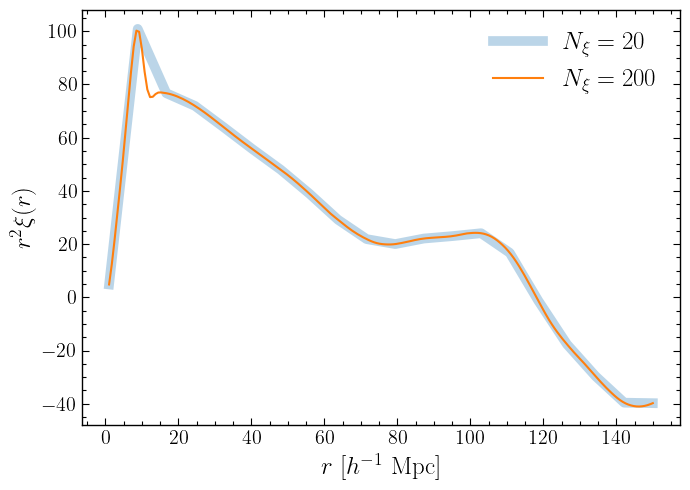
Visulization tests:
[19]:
import matplotlib.pyplot as plt

xi_num = param_input['Corr_2PCF']['xi_num']

plt.figure(figsize=(7, 5))
plt.plot(corr_2pcf.r, corr_2pcf.xi * corr_2pcf.r**2, label=rf'$N_\xi={xi_num}$', lw=7, alpha=0.3)
plt.xlabel(r'$r\ [h^{-1}\ \mathrm{Mpc}]$', fontsize='18')
plt.ylabel(r'$r^2 \xi(r)$', fontsize='18')
plt.legend(loc='best', fontsize='18')
[19]:
<matplotlib.legend.Legend at 0x7f5783b3db10>

Tips: Save the 2PCF data anytime
If you leave fout_dir empty in the param_2pcf.json file, by default, the 2PCF results will not be saved. However, you can use .save to save them at any time.
[20]:
corr_2pcf.save('./what_ever_any_folder/any_filename')
09:21:51 - INFO - pyhermes.io.base:Corr2PCFData - Writing data to ---> ./what_ever_any_folder/any_filename <---
Tips: Load the 2PCF data anytime
You can load the 2PCF data from the results of a previous run’s output anytime, then generate the corresponding plot.
[21]:
from pyhermes.io import Corr2PCFData

corr_2pcf_pre = Corr2PCFData()
[22]:
corr_2pcf_pre.load("./demo_data/corr2pcf_r5_xinum200.txt")
09:22:04 - INFO - pyhermes.io.base:Corr2PCFData - Reading data from ---> ./demo_data/corr2pcf_r5_xinum200.txt <---
[23]:
import matplotlib.pyplot as plt

xi_num_pre = 200

plt.figure(figsize=(7, 5))
plt.plot(corr_2pcf.r, corr_2pcf.xi * corr_2pcf.r**2, label=rf'$N_\xi={xi_num}$', lw=7, alpha=0.3)
plt.plot(corr_2pcf_pre.r, corr_2pcf_pre.xi * corr_2pcf_pre.r**2, label=rf'$N_\xi={xi_num_pre}$')
plt.xlabel(r'$r\ [h^{-1}\ \mathrm{Mpc}]$', fontsize='18')
plt.ylabel(r'$r^2 \xi(r)$', fontsize='18')
plt.legend(loc='best', fontsize='18')
[23]:
<matplotlib.legend.Legend at 0x7f57839499d0>
3PCF
Method1: Read DeltaC, particle and 2pcf info from path in
param_3pcf.json
The file of param_3pcf.json looks like:
{
  "Corr_3PCF": {
    "fin": {
      "path": "https://pyhermes.astroslacker.com/_downloads/906e0695649e3634a5fe8081b9ab2086/quijote10000.bin",
      "format": "generic"
    },
    "deltac_in_path": "./Output_ConvolsData_example.npy",
    "corr2pcf_in_path": "./Output_Corr2PCFData_example.txt",
    "fout_path": "./Output_Corr3PCFData_example.txt",
    "NStheta": 20,
    "R1": 20.0,
    "R2": 40.0,
    "rot_num": 3
  }
}
[24]:
from pyhermes.theory.corr3pcf import Corr_3PCF

param_input = read_param(config_path='param_3pcf.json')

# You can modify your parameters any time, in the style of dict:
param_input['Corr_3PCF']['rot_num'] = 3

corr_3pcf = Corr_3PCF(param_task=param_input).run()
09:23:08 - INFO - pyhermes.param.parambase:JsonBase - Reading configure file: '/data/luantch/ding_workspace/Hermes/github_zone/PyHermes/tests/param_3pcf.json'
09:23:08 - INFO - pyhermes.param.parambase:JsonBase - Set default parameters of module <theory> ...
09:23:08 - INFO - pyhermes.param.parambase:JsonBase - Default 'Corr_3PCF.fin.path' from './data.bin' to 'https://pyhermes.astroslacker.com/_downloads/906e0695649e3634a5fe8081b9ab2086/quijote10000.bin'
09:23:08 - INFO - pyhermes.param.parambase:JsonBase - Default 'Corr_3PCF.deltac_in_path' from 'empty' to './Output_ConvolsData_example.npy'
09:23:08 - INFO - pyhermes.param.parambase:JsonBase - Default 'Corr_3PCF.corr2pcf_in_path' from 'empty' to './Output_Corr2PCFData_example.txt'
09:23:08 - INFO - pyhermes.param.parambase:JsonBase - Default 'Corr_3PCF.fout_path' from 'empty' to './Output_Corr3PCFData_example.txt'
09:23:08 - INFO - pyhermes.param.parambase:JsonBase - Default 'Corr_3PCF.rot_num' from '10000' to '3'

09:23:08 - INFO - pyhermes.pipeline.pipeline:Corr_3PCF - The task will run on 1 MPI ranks
09:23:08 - INFO - pyhermes.io.base:Corr3PCFData - Reading 2PCF data from ---> ./Output_Corr2PCFData_example.txt <---
09:23:08 - INFO - pyhermes.pipeline.pipeline:Corr_3PCF - Hi tristan, now you already have the corr2pcf info!
09:23:08 - INFO - pyhermes.io.base:Corr3PCFData - Reading DeltaC data from ---> ./Output_ConvolsData_example.npy <---
09:23:10 - INFO - pyhermes.io.base:Corr3PCFData - DeltaC: Shape(512, 512, 512), Min = -0.0303, Max = 0.1416, Mean = 0.0030
09:23:10 - INFO - pyhermes.io.funcs:read_particle_data - Selected input particle format: generic
09:23:10 - INFO - pyhermes.io.funcs:dl_rich_pbar - File 'quijote10000.bin' already exists. Skipping download.
09:23:10 - INFO - pyhermes.io.funcs:read_generic - Reading paricle data from ---> quijote10000.bin <---
09:23:10 - INFO - pyhermes.pipeline.pipeline:Corr_3PCF - Start to calculate 3PCF ...
09:23:13 - INFO - pyhermes.pipeline.pipeline:Corr_3PCF -  Progress:   0.00%
09:23:18 - INFO - pyhermes.pipeline.pipeline:Corr_3PCF -  Progress:  19.05%
09:23:19 - INFO - pyhermes.pipeline.pipeline:Corr_3PCF -  Progress:  19.05%
09:23:20 - INFO - pyhermes.pipeline.pipeline:Corr_3PCF -  Progress:  28.57%
09:23:23 - INFO - pyhermes.pipeline.pipeline:Corr_3PCF -  Progress:  38.10%
09:23:26 - INFO - pyhermes.pipeline.pipeline:Corr_3PCF -  Progress:  47.62%
09:23:28 - INFO - pyhermes.pipeline.pipeline:Corr_3PCF -  Progress:  57.14%
09:23:31 - INFO - pyhermes.pipeline.pipeline:Corr_3PCF -  Progress:  66.67%
09:23:34 - INFO - pyhermes.pipeline.pipeline:Corr_3PCF -  Progress:  76.19%
09:23:37 - INFO - pyhermes.pipeline.pipeline:Corr_3PCF -  Progress:  85.71%
09:23:39 - INFO - pyhermes.pipeline.pipeline:Corr_3PCF -  Progress:  95.24%
09:23:39 - INFO - pyhermes.pipeline.pipeline:Corr_3PCF -  Progress: 100.00%
09:23:39 - INFO - pyhermes.pipeline.pipeline:Corr_3PCF - Finished in 28.8 sec
09:23:39 - INFO - pyhermes.pipeline.pipeline:Corr_3PCF - The time for 3PCF: 28.8183 sec
09:23:39 - INFO - pyhermes.io.base:Corr3PCFData - Writing data to ---> ./Output_Corr3PCFData_example.txt <---

09:23:39 - INFO - pyhermes.pipeline.pipeline:Corr_3PCF - The time for task: 30.9012 sec
3PCF
Method2: Load DeltaC, 2pcf and particle data directly from the result of previous step, i.e.,
deltac,corr_2pcfandp_dm
NOTICE:
Using the
deltac=andp_dm=arguments in argv will override thedeltac_in_pathandfin-pathsettings inparam_3pcf.json.To load particle data with
p_dm=, ensure you setreturn_pData=Truewhen calculatingdeltac. Ifreturn_pData=Trueis not specified, onlydeltacwill be returned. The default isFalse.
For example:
# Default:
deltac = Convols(param_task=param_input).run()
# Enable return:
deltac, pm = Convols(param_task=param_input).run(return_pData=True)
[26]:
print(deltac.data.shape)
print(type(deltac))
print('')

print(corr_2pcf.xi.shape)
print(type(corr_2pcf))
print('')

print(pm.shape)
print(type(pm))
(512, 512, 512)
<class 'pyhermes.io.convols.ConvolsData'>

(20,)
<class 'pyhermes.io.corr2pcf.Corr2PCFData'>

(406793, 3)
<class 'numpy.ndarray'>
[27]:
from pyhermes.theory.corr3pcf import Corr_3PCF

param_input = read_param(config_path='param_3pcf.json')

# You can modify your parameters any time, in the style of dict:
param_input['Corr_3PCF']['rot_num'] = 3

corr_3pcf = Corr_3PCF(param_task=param_input).run(deltac=deltac, corr2pcf=corr_2pcf, p_dm=pm)
09:27:56 - INFO - pyhermes.param.parambase:JsonBase - Reading configure file: '/data/luantch/ding_workspace/Hermes/github_zone/PyHermes/tests/param_3pcf.json'
09:27:56 - INFO - pyhermes.param.parambase:JsonBase - Set default parameters of module <theory> ...
09:27:56 - INFO - pyhermes.param.parambase:JsonBase - Default 'Corr_3PCF.fin.path' from './data.bin' to 'https://pyhermes.astroslacker.com/_downloads/906e0695649e3634a5fe8081b9ab2086/quijote10000.bin'
09:27:56 - INFO - pyhermes.param.parambase:JsonBase - Default 'Corr_3PCF.deltac_in_path' from 'empty' to './Output_ConvolsData_example.npy'
09:27:56 - INFO - pyhermes.param.parambase:JsonBase - Default 'Corr_3PCF.corr2pcf_in_path' from 'empty' to './Output_Corr2PCFData_example.txt'
09:27:56 - INFO - pyhermes.param.parambase:JsonBase - Default 'Corr_3PCF.fout_path' from 'empty' to './Output_Corr3PCFData_example.txt'
09:27:56 - INFO - pyhermes.param.parambase:JsonBase - Default 'Corr_3PCF.rot_num' from '10000' to '3'

09:27:56 - INFO - pyhermes.pipeline.pipeline:Corr_3PCF - The task will run on 1 MPI ranks
09:27:56 - INFO - pyhermes.pipeline.pipeline:Corr_3PCF - Loading Corr2pcf from argument 'corr2pcf'
09:27:56 - INFO - pyhermes.pipeline.pipeline:Corr_3PCF - Hi tristan, now you already have the corr2pcf info!
09:27:56 - INFO - pyhermes.pipeline.pipeline:Corr_3PCF - Loading DeltaC from argument 'deltac'
09:27:56 - INFO - pyhermes.pipeline.pipeline:Corr_3PCF - Loading Particle data from argument 'p_dm'
09:27:56 - INFO - pyhermes.pipeline.pipeline:Corr_3PCF - Start to calculate 3PCF ...
09:27:58 - INFO - pyhermes.pipeline.pipeline:Corr_3PCF -  Progress:   0.00%
09:28:01 - INFO - pyhermes.pipeline.pipeline:Corr_3PCF -  Progress:  19.05%
09:28:03 - INFO - pyhermes.pipeline.pipeline:Corr_3PCF -  Progress:  19.05%
09:28:04 - INFO - pyhermes.pipeline.pipeline:Corr_3PCF -  Progress:  28.57%
09:28:06 - INFO - pyhermes.pipeline.pipeline:Corr_3PCF -  Progress:  38.10%
09:28:09 - INFO - pyhermes.pipeline.pipeline:Corr_3PCF -  Progress:  47.62%
09:28:11 - INFO - pyhermes.pipeline.pipeline:Corr_3PCF -  Progress:  57.14%
09:28:13 - INFO - pyhermes.pipeline.pipeline:Corr_3PCF -  Progress:  66.67%
09:28:16 - INFO - pyhermes.pipeline.pipeline:Corr_3PCF -  Progress:  76.19%
09:28:18 - INFO - pyhermes.pipeline.pipeline:Corr_3PCF -  Progress:  85.71%
09:28:20 - INFO - pyhermes.pipeline.pipeline:Corr_3PCF -  Progress:  95.24%
09:28:20 - INFO - pyhermes.pipeline.pipeline:Corr_3PCF -  Progress: 100.00%
09:28:20 - INFO - pyhermes.pipeline.pipeline:Corr_3PCF - Finished in 23.9 sec
09:28:20 - INFO - pyhermes.pipeline.pipeline:Corr_3PCF - The time for 3PCF: 23.9216 sec
09:28:20 - WARNING - pyhermes.io.funcs:check_fout - Output file './Output_Corr3PCFData_example.txt' already exists! Generating a new file name.
09:28:20 - INFO - pyhermes.io.base:Corr3PCFData - Writing data to ---> ./Output_Corr3PCFData_example_1.txt <---

09:28:20 - INFO - pyhermes.pipeline.pipeline:Corr_3PCF - The time for task: 23.9709 sec
09:28:20 - INFO - pyhermes.pipeline.pipeline:Corr_3PCF - Bye.
The corr_3pcf instance will also inherit parameters from deltac:
[28]:
print(corr_3pcf.dict_inht_vonDeltac)
{'fin_path': 'https://pyhermes.astroslacker.com/_downloads/906e0695649e3634a5fe8081b9ab2086/quijote10000.bin', 'fin_format': 'generic', 'orgDsize': 406793, 'J': 9, 'SampRate': 1024, 'window': {'type': 'shell', 'R': 5}, 'SimBoxL': 1000, 'bandwidth': 1, 'wavelet_mode': 'db2', 'wavelet_level': 10}
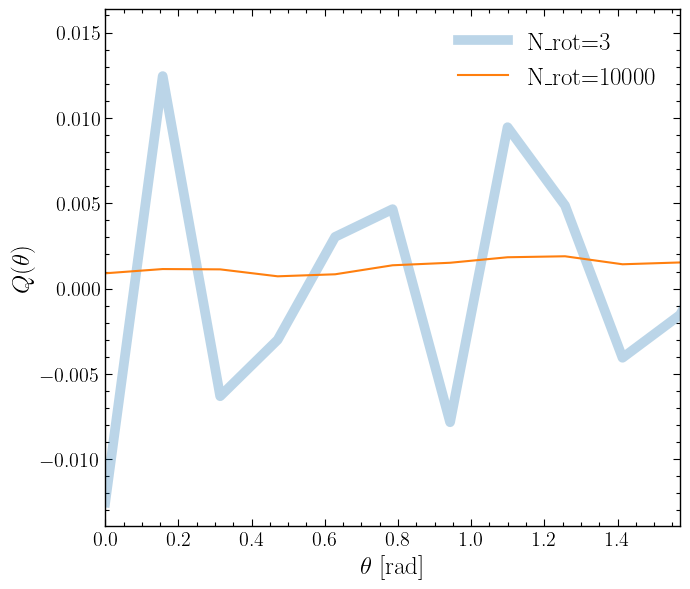
Visualization tests (demo results; further refinement needed for handling Q more effectively):
[29]:
import numpy as np
import matplotlib.pyplot as plt

N_rot = param_input['Corr_3PCF']['rot_num']

plt.figure(figsize=(7,6))
plt.plot(corr_3pcf.theta, corr_3pcf.Q, label=rf'N_rot={N_rot}', lw=7, alpha=0.3)
plt.xlabel(r'$\theta\ [\mathrm{rad}]$', fontsize='18')
plt.ylabel(r'$Q(\theta)$', fontsize='18')
plt.xlim(0., np.pi/2.)
plt.legend(loc='best', fontsize='18')
[29]:
<matplotlib.legend.Legend at 0x7f5783679990>

Tips: Save the 3PCF data anytime
If you leave fout_dir empty in the param_3pcf.json file, by default, the 3PCF results will not be saved. However, you can use .save to save them at any time.
[30]:
corr_3pcf.save('./what_ever_any_folder/any_filename')
09:30:20 - WARNING - pyhermes.io.funcs:check_fout - Output file './what_ever_any_folder/any_filename' already exists! Generating a new file name.
09:30:20 - INFO - pyhermes.io.base:Corr3PCFData - Writing data to ---> ./what_ever_any_folder/any_filename_1 <---
Tips: Load the 3PCF data anytime
You can load the 3PCF data from the results of a previous run’s output anytime, then generate the corresponding plot.
[31]:
from pyhermes.io import Corr3PCFData

corr_3pcf_pre = Corr3PCFData()
[32]:
corr_3pcf_pre.load("./demo_data/corr3pcf_r5_R1.20.0_R2.40.0_rotN10000.txt")
09:30:35 - INFO - pyhermes.io.base:Corr3PCFData - Reading data from ---> ./demo_data/corr3pcf_r5_R1.20.0_R2.40.0_rotN10000.txt <---
[33]:
import numpy as np
import matplotlib.pyplot as plt

N_rot_pre = 10000

plt.figure(figsize=(7,6))
plt.plot(corr_3pcf.theta, corr_3pcf.Q, label=rf'N_rot={N_rot}', lw=7, alpha=0.3)
plt.plot(corr_3pcf_pre.theta, corr_3pcf_pre.Q, label=rf'N_rot={N_rot_pre}')
plt.xlabel(r'$\theta\ [\mathrm{rad}]$', fontsize='18')
plt.ylabel(r'$Q(\theta)$', fontsize='18')
plt.xlim(0., np.pi/2.)
plt.legend(loc='best', fontsize='18')
[33]:
<matplotlib.legend.Legend at 0x7f578332d790>